Australia Official Passport & Visa Photo Maker

Create compliant US, UK, and AU passport photos or remove image backgrounds instantly. Download crisp, print-ready files directly to your device.

📷

Upload Photo or Take Selfie

Upload any casual photo or smartphone selfie. Our AI engine automatically aligns facial biometrics, removes background, and generates 300 DPI print-ready photos.

📱 4 Rules for Official Smartphone Photo Compliance 100% Pass

Follow these 4 golden rules to guarantee 100% automated acceptance by Australia biometric systems.

📐 1. Distance & Eye Level
Stand 1.5 - 2 meters away from camera at horizontal eye level.
☀️ 2. Uniform Illumination
Face a bright natural daylight source to avoid harsh facial shadows.
👔 3. Dark Collared Street Attire
Wear dark collared clothing that sharply contrasts with light background.
👤 4. Clear Biometrics & No Eyeglasses
Fully uncover forehead and ears with neutral closed-mouth expression. No eyeglasses.
AI Biometric Engine · Smart Align
AI Generating... 18%

Detecting facial landmarks & hair contours, calibrating to official specs...
✓ Official Standard ✓ Sub-Pixel Matting ✓ 300 DPI Print
🛡️ 100% Official Biometric Standards Compliant
35 x 45 mm | 413 x 531 px (300 DPI)
Background:

See the Difference

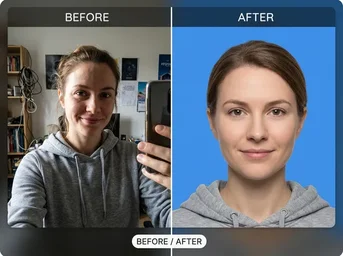
From casual snapshot to official document ready.

Passport Ready

Passport Ready

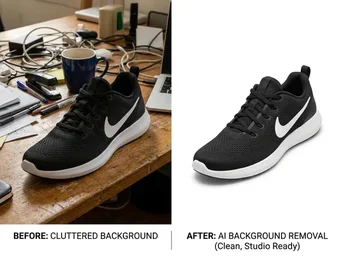
AI removes distractions and ensures perfect white background compliance.

Print Layout

Print Layout

Multiple photos arranged on a single 4x6" sheet for cheap local printing.

Background Removal

Background Removal

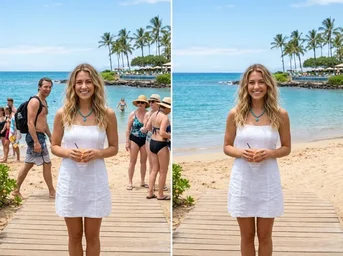
Clean cutout with no halos, ensuring biometric acceptance.

Perfect for Every Official Document

Compliant photos for passports, visas, licences, and more.

🪪

Australian Passport & Visa

Strictly follow Department of Home Affairs guidelines. 35x45mm size with pure white background for seamless online lodgement.

🚗

State Driver Licences

Compliant headshots for NSW, VIC, QLD, and WA licences. Correct face centring and neutral expression requirements met automatically.

🏥

Medicare & Electoral ID

Generate official-sized photos for Medicare cards and Australian Electoral Commission voter registration without studio fees.

✈️

Working Holiday Visas

Quick, compliant photos for WHV applications. Ensures correct lighting and background to avoid rejection delays.

🎓

University Student IDs

Professional headshots for student identification cards. Clean, plain background suitable for campus access and library services.

🖨️

Print-Ready Layout Sheets

Automatically arrange multiple photos onto standard 4x6" (10x15cm) sheets, ready for instant printing at Officeworks or Kmart.

Why Choose Dopic for Australian Photos

Fast, free, and strictly compliant with local regulations.

🔒

100% In-Browser Privacy

Your photos are processed locally on your device. Nothing is uploaded to our servers, ensuring complete data privacy.

⚡

3-Second Smart Alignment

AI detects face position and adjusts framing to meet strict biometric centring requirements for Australian documents.

📐

Exact 35x45mm Dimensions

No cropping guesswork. We generate images in the precise pixel dimensions required by the Australian Passport Office.

Get Your Photo in 3 Steps

Simple, fast, and free.

01

Upload

Take a selfie or upload an existing photo. Our AI works entirely in your browser for privacy.

02

Auto-Adjust

Select Australian Passport or 'Visa'. The tool automatically crops to 35x45mm and sets the background to white.

03

Download & Print

Download the print-ready 4x6" sheet. Take it to a local pharmacy or office supply store for instant, cheap printing.

Common Questions About Australian ID Photos

Everything you need to know before printing.

What is the official background colour for Australian passport photos? +

The official requirement is a plain, light greyish-blue background. However, for digital submissions and many visa applications, a pure white background is widely accepted and recommended for clarity. Dopic provides a clean white background option that meets most digital lodgement standards.

Can I print these photos at Officeworks or Kmart? +

Yes. Dopic generates standard 4x6" (10x15cm) layout sheets containing multiple photos. You can download this sheet and print it at any local Officeworks Photo Centre, Kmart Photo, Harvey Norman, or Chemist Warehouse for just $0.10–$0.50 per sheet.

Does Dopic store my photo data? +

No. All image processing, including background removal and resizing, happens directly in your browser using WebAssembly technology. Your original photo never leaves your device, ensuring maximum privacy and security.

What are the exact size requirements for an Australian passport photo? +

The photo must be 35mm wide by 45mm high. The head height should be between 32mm and 36mm. The face must be centred, looking straight ahead with a neutral expression, and wearing everyday clothing (no uniforms or hats).

35 x 45 mm
🔍 Zoom
📸 Take Photo with Web Camera 35 x 45 mm
💡 Official Biometric Alignment HUD: Wear clothing that contrasts with the white background. Avoid wearing white shirts or light-coloured tops that blend into the background. Solid colours are preferred over busy patterns. Ensure your attire is neat and appropriate for an official document. · Position the camera at eye level to avoid distortion. Ensure the subject is centred in the frame. Use natural lighting or diffused artificial light to eliminate harsh shadows under the eyes, nose, or chin. Do not use flash directly on the subject to prevent glare on glasses or skin. Verify that the entire head and shoulders are captured within the 35x45mm crop area without cutting off any part of the hair or ears.
👀 👀 EYE LEVEL
👤 Australian Passport Photo · Align Eyes & Face to Oval