New Zealand Official Passport & Visa Photo Maker

Perfect for visa applications, e-commerce listings, and social media posts. Download clean, print-ready assets instantly with no sign-up required.

📷

Upload Photo or Take Selfie

Upload any casual photo or smartphone selfie. Our AI engine automatically aligns facial biometrics, removes background, and generates 300 DPI print-ready photos.

📱 4 Rules for Official Smartphone Photo Compliance 100% Pass

Follow these 4 golden rules to guarantee 100% automated acceptance by New Zealand biometric systems.

📐 1. Distance & Eye Level
Stand 1.5 - 2 meters away from camera at horizontal eye level.
☀️ 2. Uniform Illumination
Face a bright natural daylight source to avoid harsh facial shadows.
👔 3. Dark Collared Street Attire
Wear dark collared clothing that sharply contrasts with light background.
👤 4. Clear Biometrics & No Eyeglasses
Fully uncover forehead and ears with neutral closed-mouth expression. No eyeglasses.
AI Biometric Engine · Smart Align
AI Generating... 18%

Detecting facial landmarks & hair contours, calibrating to official specs...
✓ Official Standard ✓ Sub-Pixel Matting ✓ 300 DPI Print
🛡️ 100% Official Biometric Standards Compliant
35 x 45 mm | 413 x 531 px (300 DPI)
Background:

See the Difference

From casual snapshots to official compliance.

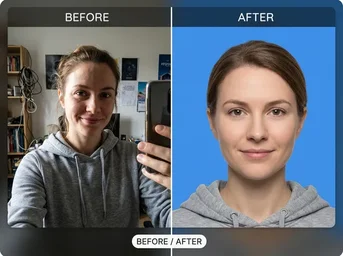
Passport Compliance

Passport Compliance

Before: Casual selfie. After: Centered face, pure white background, correct dimensions.

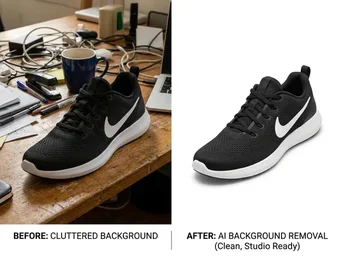
E-commerce Ready

E-commerce Ready

Before: Cluttered desk background. After: Clean transparent PNG for product listing.

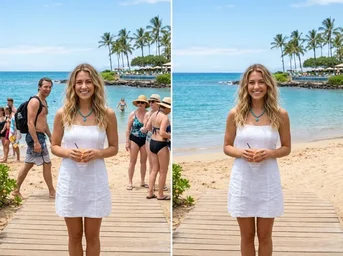
Object Removal

Object Removal

Before: Photo with distracting tourist. After: Seamless, clean background.

Perfect Photos for Every NZ Requirement

Compliant with Department of Internal Affairs standards for passports, visas, and licences.

🪪

NZ Passport & Biometric Capture

Generate strict 35x45mm photos with pure white backgrounds (#FFFFFF) for new passports or renewals. Ensures correct head height and neutral expression for seamless Department of Internal Affairs approval.

✈️

Visa & NZeTA Applications

Fast-track your Visitor, Work, Student, or Resident Visa applications. Includes specific templates for the NZeTA mobile app submission, ensuring your photo meets all immigration biometric requirements.

🚗

Driver Licence & Identity Card

Create compliant photos for your NZ Driver Licence (front and back signature/photo layout). Meets Land Transport NZ standards for clear facial features and proper lighting.

🛍️

E-commerce Product Cutouts

Switch modes to create crisp, transparent PNGs for your Shopify or Amazon listings. Remove backgrounds instantly for pure white product shots that boost conversion rates.

🪄

Magic Object Eraser

Seamlessly remove unwanted tourists, power lines, or blemishes from your travel photos. Our AI inpainting fills gaps naturally, preserving texture and lighting without manual editing.

📉

Lossless Image Compression

Shrink large photo files to exact size limits (e.g., under 20KB or 100KB) without visible quality loss. Perfect for uploading documents to government portals or email attachments.

Why Choose Dopic for NZ Photos?

Built for speed, accuracy, and privacy.

🔒

100% In-Browser Privacy

Your photos never leave your device. All processing happens locally in your browser, ensuring complete data security and zero watermark on exports.

⚡

3-Second Smart Alignment

Our AI automatically detects your face, centers it perfectly, and adjusts head height to meet strict biometric guidelines for NZ passports and visas.

📐

Print-Ready 4x6" Sheets

Automatically arrange up to 8 photos on a standard 4x6" sheet. Print at any local FedEx Office, Staples, or pharmacy for just $5-$10, saving you studio fees.

How to Create Your NZ Photo

Three simple steps to compliance.

01

Upload

Take a selfie against a light wall or upload an existing photo. Ensure good lighting and no glasses.

02

Auto-Adjust

Select NZ Passport or 'Visa'. The AI will crop to 35x45mm, center your face, and set the pure white background.

03

Print

Download the 4x6" layout sheet. Print at home or visit a local FedEx/Staples for professional results.

Frequently Asked Questions

Common questions about NZ photo requirements.

What is the official background color for NZ passport photos? +

The official background must be plain white (#FFFFFF). No patterns, shadows, or other colors are permitted by the Department of Internal Affairs.

Can I use this for my NZeTA application? +

Yes. Dopic generates photos that meet the specific resolution and framing requirements for the NZeTA mobile app submission process.

How do I print these photos cheaply in New Zealand? +

Download the generated 4x6" layout sheet and print it at any local FedEx Office, Staples, Kinkos, or pharmacy. This typically costs between $5 and $10 per sheet, much cheaper than professional studios.

Is my photo data safe? +

Absolutely. Dopic processes all images directly in your browser. We do not upload, store, or share your personal photos on our servers.

35 x 45 mm
🔍 Zoom
📸 Take Photo with Web Camera 35 x 45 mm
💡 Official Biometric Alignment HUD: Wear clothing that contrasts clearly with the background (e.g., dark clothes against a white background). Avoid uniforms, camouflage patterns, or clothing with excessive logos/text. Do not wear white shirts if the background is white. · Use a high-resolution camera with a macro lens or portrait mode. Position the subject approximately 1-2 meters away to avoid distortion. Use diffused natural light or softbox lighting to eliminate harsh shadows under the nose, chin, and eyes. Ensure the background is evenly lit and free of wrinkles or objects.
👀 👀 EYE LEVEL
👤 Standard Passport Photo · Align Eyes & Face to Oval