Uganda Official Passport & Visa Photo Maker

Perfect for WhatsApp profiles, job resumes, and visa apps. Download edited photos instantly with zero watermarks or sign-ups.

📷

Upload Photo or Take Selfie

Upload any casual photo or smartphone selfie. Our AI engine automatically aligns facial biometrics, removes background, and generates 300 DPI print-ready photos.

📱 4 Rules for Official Smartphone Photo Compliance 100% Pass

Follow these 4 golden rules to guarantee 100% automated acceptance by Uganda biometric systems.

📐 1. Distance & Eye Level
Stand 1.5 - 2 meters away from camera at horizontal eye level.
☀️ 2. Uniform Illumination
Face a bright natural daylight source to avoid harsh facial shadows.
👔 3. Dark Collared Street Attire
Wear dark collared clothing that sharply contrasts with light background.
👤 4. Clear Biometrics & No Eyeglasses
Fully uncover forehead and ears with neutral closed-mouth expression. No eyeglasses.
AI Biometric Engine · Smart Align
AI Generating... 18%

Detecting facial landmarks & hair contours, calibrating to official specs...
✓ Official Standard ✓ Sub-Pixel Matting ✓ 300 DPI Print
🛡️ 100% Official Biometric Standards Compliant
35 x 45 mm | 413 x 531 px (300 DPI)
Background:

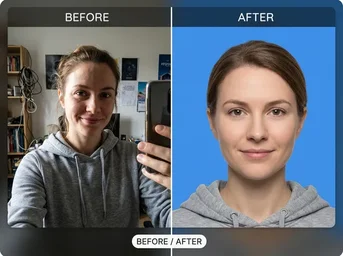
See the Difference

From casual snapshot to official document standard.

Passport Photo Standard

Passport Photo Standard

Auto-cropped to 35x45mm with perfect white background and face alignment.

Print Layout Sheet

Print Layout Sheet

Multiple photos arranged on a single 4x6" sheet for bulk printing.

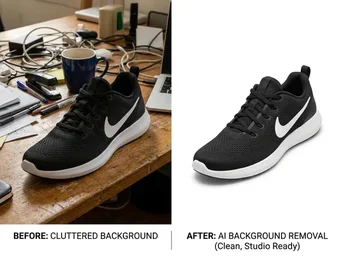
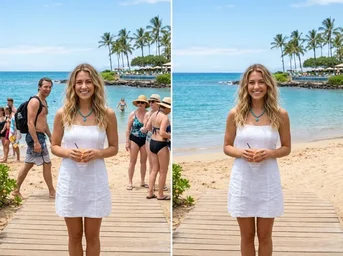
Background Removal

Background Removal

Clean cutout removing cluttered backgrounds for official compliance.

Official Photo Solutions for Every Ugandan Need

Compliant formats for government, education, and travel applications.

🪪

Biometric Passport & Visa

Generate 35x45mm photos with pure white backgrounds strictly compliant with Department of Citizenship and Immigration Services (DCIS) standards for passports and entry visas.

🆔

National ID & Work Permits

Create precise 35x45mm National ID front photos or compact 20x22mm work permit images, ensuring correct face centering and lighting for NIRA and Ministry of Labour submissions.

📚

University & TPIN Applications

Produce ready-to-use 35x45mm photos for university admissions, TPIN certificates, and health insurance cards, meeting all institutional documentation requirements instantly.

🚗

Driver's License & Bank IDs

Capture accurate 35x45mm headshots for URA driver's licenses and bank account verifications, ensuring your photo meets strict biometric facial recognition criteria.

🌍

Police Clearance (PCC)

Prepare 35x45mm photos for Police Clearance Certificates required for international work or study, formatted correctly to avoid rejection by foreign embassies.

🖨️

Print-Ready Layout Sheets

Export high-resolution 4x6" layout sheets containing multiple photos, optimized for low-cost printing at local Quick Print Centres, PostNet Uganda, and neighborhood photo studios.

Why Choose Dopic for Uganda Documents?

Fast, free, and strictly compliant with local regulations.

🔒

100% In-Browser Privacy

Your photos are processed locally on your device. No data is uploaded to servers, ensuring complete privacy for your personal identification documents.

⚡

3-Second Smart Alignment

AI detects your face and automatically centers it within the 35x45mm or 20x22mm frame, adjusting for height and eye level to meet DCIS biometric rules.

📐

Exact White Background

Automatically replaces busy backgrounds with pure white, eliminating shadows and reflections that cause application rejections at immigration offices.

How to Create Your Official Photo

Three simple steps to DCIS compliance.

01

Upload Photo

Take a selfie against a plain wall or upload an existing photo. Ensure good lighting and no glasses or hats.

02

Select Specification

Choose Uganda Passport (35x45mm) or other official formats like National ID or Visa. The AI will auto-crop and whiten the background.

03

Download & Print

Download the high-res individual photo or the 4x6" print sheet. Visit a local print shop to get physical copies for your application.

Frequently Asked Questions

Common questions about Uganda photo specifications.

What is the official background color for Uganda passport photos? +

The Department of Citizenship and Immigration Services (DCIS) requires a pure white background. No patterns, gradients, or off-white shades are accepted.

Can I print these photos at home or local shops? +

Yes. Dopic generates 4x6" layout sheets. You can print these at any local Quick Print Centre, PostNet Uganda, Office Centre, or neighborhood photo studio for as little as 2,000-5,000 UGX, saving up to 60% compared to professional studio prices.

Does this tool work for National ID and TPIN photos? +

Absolutely. The tool supports 35x45mm dimensions for National ID cards, TPIN certificates, university admissions, and driver's licenses, ensuring correct face framing and lighting.

Is my photo data stored on your servers? +

No. All processing happens directly in your browser using client-side technology. Your original image never leaves your device, ensuring maximum security and privacy.

35 x 45 mm
🔍 Zoom
📸 Take Photo with Web Camera 35 x 45 mm
💡 Official Biometric Alignment HUD: Wear clothing that contrasts with the white background to ensure clear separation of the silhouette. Avoid wearing white shirts or light-colored tops that blend into the background. Solid colors are preferred over busy patterns. Collared shirts are recommended for a formal appearance. Ensure necklines are modest and do not distract from the facial features. · Position the subject approximately 1.5 to 2 meters away from the camera lens to minimize perspective distortion. Use a tripod to ensure stability and sharpness. Ensure the lighting source is diffuse and frontal to eliminate shadows under the eyes, nose, and chin. Check for red-eye effect and remove it if present. Verify that the eyes are aligned horizontally and the head is upright, not tilted forward, backward, or to the sides. Confirm that the entire head, from the top of the hair to the bottom of the chin, fits within the frame without cropping.
👀 👀 EYE LEVEL
👤 Biometric Passport Photo · Align Eyes & Face to Oval