South Africa Official Passport & Visa Photo Maker

Perfect for visa applications, e-commerce product shots, and social media content. Download optimized, high-quality images instantly in your browser.

📷

Upload Photo or Take Selfie

Upload any casual photo or smartphone selfie. Our AI engine automatically aligns facial biometrics, removes background, and generates 300 DPI print-ready photos.

📱 4 Rules for Official Smartphone Photo Compliance 100% Pass

Follow these 4 golden rules to guarantee 100% automated acceptance by South Africa biometric systems.

📐 1. Distance & Eye Level
Stand 1.5 - 2 meters away from camera at horizontal eye level.
☀️ 2. Uniform Illumination
Face a bright natural daylight source to avoid harsh facial shadows.
👔 3. Dark Collared Street Attire
Wear dark collared clothing that sharply contrasts with light background.
👤 4. Clear Biometrics & No Eyeglasses
Fully uncover forehead and ears with neutral closed-mouth expression. No eyeglasses.
AI Biometric Engine · Smart Align
AI Generating... 18%

Detecting facial landmarks & hair contours, calibrating to official specs...
✓ Official Standard ✓ Sub-Pixel Matting ✓ 300 DPI Print
🛡️ 100% Official Biometric Standards Compliant
35 x 45 mm | 413 x 531 px (300 DPI)
Background:

Real-World Applications

See how Dopic simplifies your documentation

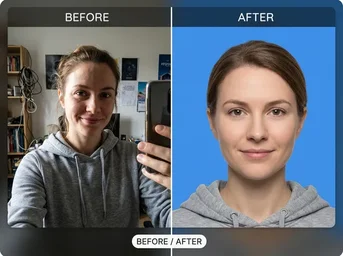
DHA Compliant ID Photo

DHA Compliant ID Photo

A standard portrait converted to a 35x45mm biometric photo with a pure white background, ready for Home Affairs submission.

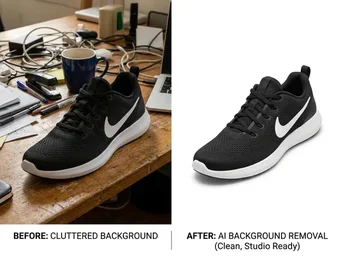
Takealot Product Image

Takealot Product Image

A cluttered product shot cleaned up with a transparent background and pure white fill, optimized for e-commerce listings.

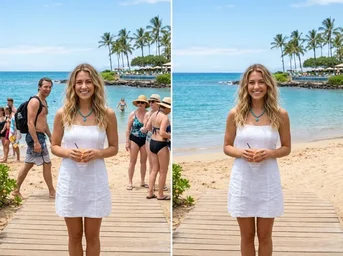
Crowd-Free Portrait

Crowd-Free Portrait

A family photo where an unwanted person in the background has been seamlessly erased, leaving a clean subject.

Essential Use Cases for South African Residents

Compliant tools for every official document need

🪪

Smart ID & Biometric Passport

Generate exact 35x45mm photos with pure white backgrounds required by the Department of Home Affairs. Includes automatic face centering and size verification for new IDs and passports.

✈️

Visa & Travel Documents

Prepare compliant photos for Work Visas, Study Visas, Critical Skills Visas, Business Visas, Temporary Travel Documents, Refugee Travel Documents, and Asylum Seeker Permits without rejection risks.

👶

Child Passport Photos

Specialized layout for minor applicants. Ensures correct head proportions and neutral expressions meet strict biometric standards for children's passports.

🛍️

E-Commerce Product Listings

Transform product shots into crisp, pure white background images for Takealot, Amazon, or Shopify. Uses sub-pixel hair matting for professional cutouts.

🪄

Object & Blemish Removal

Seamlessly erase unwanted tourists, text, or skin blemishes from photos using our AI Magic Eraser. Perfect for cleaning up ID photo backgrounds before submission.

📉

File Size Compression

Reduce image file sizes to exact limits (e.g., under 100KB or 200KB) without losing quality. Essential for uploading documents to government portals or email attachments.

Why Choose Dopic for SA Documents?

Privacy, precision, and local compliance

🔒

100% In-Browser Privacy

Your photos are processed locally on your device. No images are uploaded to external servers, ensuring complete data privacy and security.

⚡

Instant 3-Second Alignment

Our AI detects facial landmarks instantly, auto-cropping and centering your face to meet strict biometric requirements in seconds.

🖨️

Local Print Savings

Download print-ready 4x6" sheets. Save up to 80% by printing at home or at local kiosks like Clicks, Dis-Chem, The Photo Studio, or SnapIt for just R15-R25 per sheet.

How to Create Your Official Photo

Three simple steps to compliance

01

Upload Your Photo

Select your portrait from your gallery. Supports JPG, PNG, HEIC, and WebP formats.

02

Auto-Adjust & Cutout

Select 'South Africa ID/Passport'. Our AI automatically removes the background, replaces it with pure white, and centers your face.

03

Download & Print

Download the individual cropped photo or the 4x6" print sheet. Print at home or at any local Clicks/Dis-Chem kiosk.

Frequently Asked Questions

Common queries about SA photo requirements

What is the official background color for South African ID and Passport photos? +

The Department of Home Affairs strictly requires a pure white background. Blue or grey backgrounds will result in rejection.

Can I use Dopic to create photos for my Work Visa or Study Visa? +

Yes. Dopic supports all official South African visa categories, including Work, Study, Critical Skills, Business, and Temporary Travel Documents, all adhering to the 35x45mm standard.

How can I save money on printing my ID photos? +

Instead of paying R50+ at professional studios, use Dopic to generate a 4x6" print sheet. You can print this at home or visit local stores like Clicks, Dis-Chem, or SnapIt for as little as R15-R25 per sheet.

Is my photo data safe when using Dopic? +

Absolutely. All processing happens directly in your browser. Your original images never leave your device, ensuring maximum privacy and security.

35 x 45 mm
🔍 Zoom
📸 Take Photo with Web Camera 35 x 45 mm
💡 Official Biometric Alignment HUD: Wear solid-coloured clothing that contrasts clearly with the white background. Avoid wearing white shirts or light-coloured tops that blend into the background. Patterns, logos, or busy designs should be avoided as they can distract from facial recognition. Collared shirts or formal attire are recommended for a professional appearance. · Position the camera at eye level to ensure a straight-on perspective. Ensure the subject stands approximately 1-2 meters away from the lens to avoid distortion. Use diffused, front-facing lighting to eliminate shadows under the eyes, nose, and chin. Verify that the entire head and shoulders are captured within the frame, leaving minimal margin around the edges. Check for red-eye effect and remove any digital filters or retouching.
👀 👀 EYE LEVEL
👤 South African Smart ID Card · Align Eyes & Face to Oval